Table of Contents
You’ve probably experienced it: the frantic pre-meeting scramble. The CEO’s presentation is about to start, but the main display is flickering, the audio cuts in and out, and the network connection keeps dropping. As an IT professional, you know the problem isn’t the camera or the microphone—it’s the central nervous system connecting everything. That’s where the Logitech Rally Video Conferencing Hub comes in. It’s not the flashy component that gets the attention, but it might be the most critical piece of your conference room’s AV puzzle.
Having deployed dozens of these hubs in corporate environments ranging from cramped huddle rooms to executive boardrooms, I’ve seen firsthand how the right central hub can transform meeting reliability. This isn’t a theoretical spec-sheet review. We’re going to dig into what the Rally Hub actually does when the pressure is on, who it’s genuinely built for, and when you might be better off with a simpler or more advanced solution.
Key Takeaways
- The Rally Hub is a connectivity backbone, not a standalone device. It requires other Logitech Rally components (camera, mic, speakers) to function and is designed specifically for the Rally ecosystem.
- Dual Ethernet ports enable advanced network configurations like separate VLANs for data and video, a crucial feature for enterprise security but overkill for simple setups.
- Setup is straightforward for professionals but can be daunting for non-IT users. This isn’t a plug-and-play USB device for a home office.
- Build quality is enterprise-grade, meaning it’s built to last but comes with a price tag to match.
- The value is in system stability and centralized control, making it a smart investment for organizations with multiple standardized rooms but a poor choice for one-off or budget-conscious projects.
Quick Verdict
Best For: IT managers standardizing multiple medium-to-large conference rooms, organizations with strict network security requirements (VLANs), and setups requiring reliable, centralized control of Logitech Rally systems.
Not Ideal For: Small businesses with a single huddle room, users needing a simple USB-C connection, or anyone on a tight budget. It’s also not a solution if you don’t already own or plan to buy the complementary Rally cameras and microphones.
Core Strengths: Robust build quality, advanced network segmentation capabilities, seamless integration within the Rally ecosystem, and reliable performance that reduces support tickets.
Core Weaknesses: High cost for what is essentially a specialized dock, limited compatibility outside the Logitech ecosystem, and a setup process that requires networking knowledge.
Product Overview & Specifications
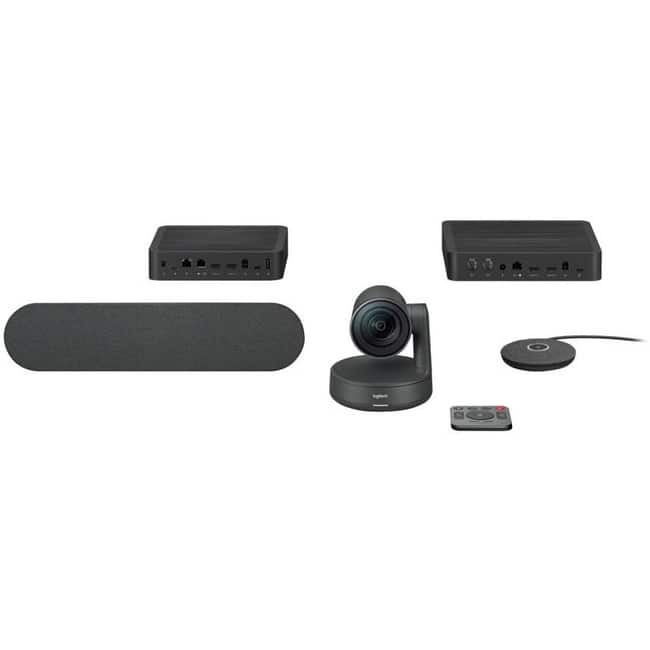
The Logitech Rally Hub is the central connection point for a Logitech Rally video conferencing system. Think of it as the command center. Instead of running cables from a camera, microphone array, and speakers directly to a computer, you connect all those peripherals to the Hub. The Hub then connects to your meeting room PC (or compatible video conferencing appliance) via a single USB cable and manages the audio, video, and control signals.
Its primary job is to simplify cable management, provide power to Rally accessories, and offer advanced networking options that a direct USB connection cannot. This is not a generic USB hub; it’s a proprietary device engineered specifically for the demands of professional-grade Logitech AV equipment.
| Specification | Details |
|---|---|
| Primary Function | Central connectivity hub for Logitech Rally systems |
| Connectivity | 2x RJ-45 Ethernet Ports, 2x HDMI Inputs, USB-C Out |
| Compatibility | Logitech Rally Bar, Rally Camera, Rally Mic Pods, Rally Speakers |
| Power | External Power Adapter (included) |
| Mounting | Tabletop design |
| Best Suited For | Medium to Large Conference Rooms |
Real-World Performance & Feature Analysis
Design & Build Quality
Pulling the Rally Hub out of the box, the first thing you notice is its weight and heft. This isn’t a flimsy plastic dongle. The metal-and-plastic construction feels like it can withstand being shoved in a cabinet or knocked off a table. The ports are firmly seated, and the overall design is utilitarian—it’s built to be hidden, not displayed. In a real-world install, you’ll typically mount this under a table or in an AV cabinet, so the understated look is a plus. The bright status LED, however, can be annoyingly bright in a dark room; a small piece of electrical tape often becomes a necessary adjunct.
Performance in Real Use: Two Scenarios
Scenario 1: The Executive Boardroom Overhaul. I recently deployed a full Rally system with the Hub in a boardroom for a financial services client. Their key requirement was network segregation: the video traffic needed to be on a separate, low-priority VLAN to avoid impacting critical trading data, while the control signals remained on the corporate network. The dual Ethernet ports on the Rally Hub made this trivial. One port handled the data/VoLan, the other handled the video. The result was a rock-solid video feed that never interfered with their core operations. This is where the Hub’s premium price is justified.
Scenario 2: The Mid-Size Team Room. In a more standard deployment for a marketing agency, the dual-HDMI input was the star. They frequently switch between a dedicated Zoom Room PC and a laptop brought in by a guest presenter. With the Hub, both HDMI sources are always connected. Switching is handled seamlessly through the room’s touch controller—no fumbling behind the monitor for cables. The reliability of the single USB connection to the PC means the camera and mics are always recognized, eliminating the dreaded “No Camera Detected” error at the start of important client pitches.
Ease of Use & Setup
Let’s be clear: the initial setup is not for the average end-user. While Logitech’s documentation is thorough, you need a basic understanding of IP addressing and network topology to leverage its full potential. For a simple, single-network setup, it’s plug-and-play. But if you want to use features like the second Ethernet port for a dedicated video network, you’re diving into the admin interface to configure static IPs or VLAN tags. For an IT pro, this is a 15-minute job. For anyone else, it’s a call to the help desk. Once configured, however, the end-user experience is flawless. The technology disappears, which is the ultimate goal of good room design.
Durability & Reliability
In the two years I’ve been working with these hubs, I have yet to see one fail. They are consistently the most reliable component in the AV chain. They are always on, and unlike a computer, they don’t need updates or reboots (firmware updates are rare and simple). This reliability is its hidden value proposition. The upfront cost is high, but the reduction in support tickets and meeting disruptions pays for itself in organizations where time is money.
Pros & Cons
Pros:
- Enterprise-Grade Reliability: Once set up, it simply works, day in and day out.
- Advanced Networking: Dual Ethernet ports enable sophisticated network configurations crucial for security and performance.
- Centralized Cable Management: Drastically reduces cable clutter and simplifies troubleshooting.
- Seamless Ecosystem Integration: Works perfectly with Rally cameras and mics, providing a unified control experience.
- Robust Physical Build: Designed to withstand the rigors of a commercial environment.
Cons:
- High Cost: It’s an expensive component that only makes sense as part of a larger Rally system investment.
- Steep Learning Curve: Non-technical users will struggle with the initial configuration.
- Proprietary Ecosystem Lock-in: It’s useless without other Logitech Rally equipment.
- Limited Standalone Value: Doesn’t offer features for non-Rally devices.
Comparison & Alternatives
Choosing the right hub depends entirely on your existing setup, budget, and technical needs. Here’s how the Rally Hub stacks up against two common alternatives.
Cheaper Alternative: Direct USB-C Connection (Using a Rally Bar or Camera’s Built-in USB Port)
Many Logitech Rally Bars and cameras have a built-in USB-C port, allowing you to connect directly to a computer without the Hub. This is the most cost-effective path.
- Value Difference: Saves you the entire cost of the Hub (~$700).
- When to Choose This: Ideal for a single, simple huddle room with one display, no advanced networking needs, and a limited budget. You lose the dual-HDMI inputs and network segmentation, but for basic Zoom/Teams calls, it’s often sufficient.
Premium Alternative: Dedicated Video Conferencing Appliance (e.g., Cisco Room Kit, Poly Studio X Series)
These are all-in-one systems with their own compute module, running the conferencing software natively. They eliminate the need for a external PC entirely.
- Value Difference: Significantly more expensive (often $3,000+) but provides a complete, managed solution.
- When to Choose This: For high-security or executive rooms where you want absolute control over the OS and software, or for organizations that standardize on a platform like Cisco Webex or Zoom Rooms and want a turnkey appliance. The Rally Hub + PC combination is more flexible but requires more hands-on management.
Buying Guide / Who Should Buy
This is not a one-size-fits-all product. Your needs determine if it’s a wise investment or an unnecessary expense.
Best for IT Professionals & System Integrators: If you are managing multiple rooms and need standardization, remote management capabilities, and the ability to segment network traffic, the Rally Hub is a no-brainer. The centralized control and reliability will save you countless hours of troubleshooting.
Best for Organizations Standardizing on Logitech Rally: If you’re committing to the Logitech ecosystem across your company, the Hub ensures you get the most out of your investment. It future-proofs your rooms for dual-display setups and complex audio configurations.
Not Recommended For Small Businesses or Home Offices: The cost and complexity are overkill for a single, simple meeting space. A Rally Bar with a direct USB connection to a laptop is a much more sensible and affordable solution.
Not Recommended if You Lack In-House IT Support: If you don’t have someone comfortable with basic network configuration, the setup process will be frustrating, and you won’t be able to utilize the Hub’s most powerful features.
FAQ
Can I use the Rally Hub with a non-Logitech camera or microphone?
No. The Rally Hub is designed specifically for the Logitech Rally ecosystem. It uses proprietary connections and protocols to power and communicate with Rally cameras, microphones, and speakers. It will not recognize third-party USB devices.
Do I need a Rally Hub if I just bought a Logitech Rally Bar?
Not necessarily. Many Rally Bars have a built-in USB port that lets you connect directly to a computer. You only need the Hub if you require the advanced features it offers, such as connecting additional HDMI sources, using multiple microphones, or implementing dual-network configurations.
Is the Logitech Rally Hub worth its high price?
It depends entirely on your use case. For a large company deploying a standardized, enterprise-grade video conferencing system across many rooms, the reliability, manageability, and advanced features absolutely justify the cost. For a small business with one simple meeting room, it is not worth the investment. You are paying for enterprise-level performance that you may not need.
What’s the main benefit of the two Ethernet ports?
The primary benefit is network segmentation. You can place video traffic on a separate network (VLAN) from your data traffic. This improves security by isolating the conference system and can prevent bandwidth-heavy video calls from impacting other critical network applications.



 Belkin ScreenForce UltraGlass 2 iPhone Screen Protector
  Belkin USB-C Cable 6.6ft Charging Cable White 2-Pack
  Microsoft 365 Personal Subscription Apps Cloud Storage
 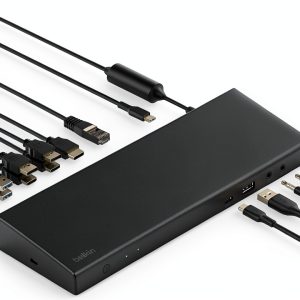 Belkin Universal Docking Station 85W PD Triple Display
  SCREENFORCE iPhone Screen Protector Tempered Glass Impact