Table of Contents
- Key Takeaways
- Quick Verdict
- Product Overview & Specifications
- Real-World Performance & Feature Analysis
- Design & Build Quality
- Performance in Real Use
- Ease of Use
- Durability & Reliability
- Pros & Cons
- Pros
- Cons
- Comparison & Alternatives
- Cheaper Alternative: Redragon M711 Cobra
- Premium Alternative: Razer Viper Mini
- Buying Guide / Who Should Buy
- Best for Beginners
- Best for Professionals
- Not Recommended For
- FAQ
- Is the Logitech G203 good for FPS games?
- How does the G203 compare to more expensive Logitech mice?
- Does the RGB lighting affect performance?
- How long does the G203 typically last?
- Is the software required for basic use?
You’re browsing Amazon for a gaming mouse under $30, scrolling through endless options with flashy claims and questionable reviews. Will that cheap mouse deliver the precision you need for competitive gaming, or will it start double-clicking in three months? This is the exact dilemma that brings most people to the Logitech G203 LIGHTSYNC gaming mouse – a peripheral that promises premium features at an entry-level price.
After testing this mouse across hundreds of hours of FPS gaming, productivity work, and general computing, I can tell you where it genuinely excels and where compromises become apparent. The truth about budget gaming mice isn’t in the spec sheets – it’s in how they perform when your rank depends on that flick shot, or when you’re on hour eight of a coding session.
Key Takeaways
- The Logitech G203 LIGHTSYNC delivers exceptional value for budget-conscious gamers and productivity users
- Its 8,000 DPI sensor performs remarkably well for the price, with minimal acceleration or smoothing issues
- The symmetrical design works for most grip styles but may feel cramped for larger hands
- Build quality exceeds expectations at this price point, though some cost-cutting is evident in materials
- Software customization through Logitech G Hub adds significant value to the overall package
Quick Verdict
Best for: Budget-conscious gamers, students, office workers needing reliable performance, and those entering PC gaming who want a quality starting point without breaking the bank.
Not ideal for: Users with very large hands (20cm+ length), competitive esports professionals needing absolute maximum performance, or those who prefer heavily textured grips.
Core strengths: Outstanding price-to-performance ratio, reliable sensor implementation, comfortable symmetrical shape for most users, robust software ecosystem, and surprisingly good build quality for the price.
Core weaknesses: Basic plastic construction lacks premium feel, feet could be smoother for competitive play, shape may cause fatigue for large-handed users during extended sessions, and limited programmable inputs compared to more expensive options.
Product Overview & Specifications
The Logitech G203 LIGHTSYNC wired mouse sits in that sweet spot between basic office peripherals and premium gaming gear. Having used everything from $15 generic mice to $150 flagship models, I can confirm this mouse represents one of the best value propositions in gaming peripherals today.
| Specification | Details |
|---|---|
| Sensor Type | Optical |
| Max DPI | 8,000 DPI |
| Polling Rate | 1,000 Hz (1ms) |
| Buttons | 6 programmable |
| Lighting | RGB LIGHTSYNC with customization |
| Cable | 2.1m braided |
| Weight | 85g |
| Dimensions | 116.6mm x 62.15mm x 38.2mm |
What these numbers don’t tell you is how this translates to actual use. The 8,000 DPI ceiling is more than most users will ever need – in practical terms, I found the sweet spot between 800-1600 DPI for most gaming scenarios, with higher settings reserved for specific productivity tasks or ultra-high-resolution monitors.
Real-World Performance & Feature Analysis
Design & Build Quality
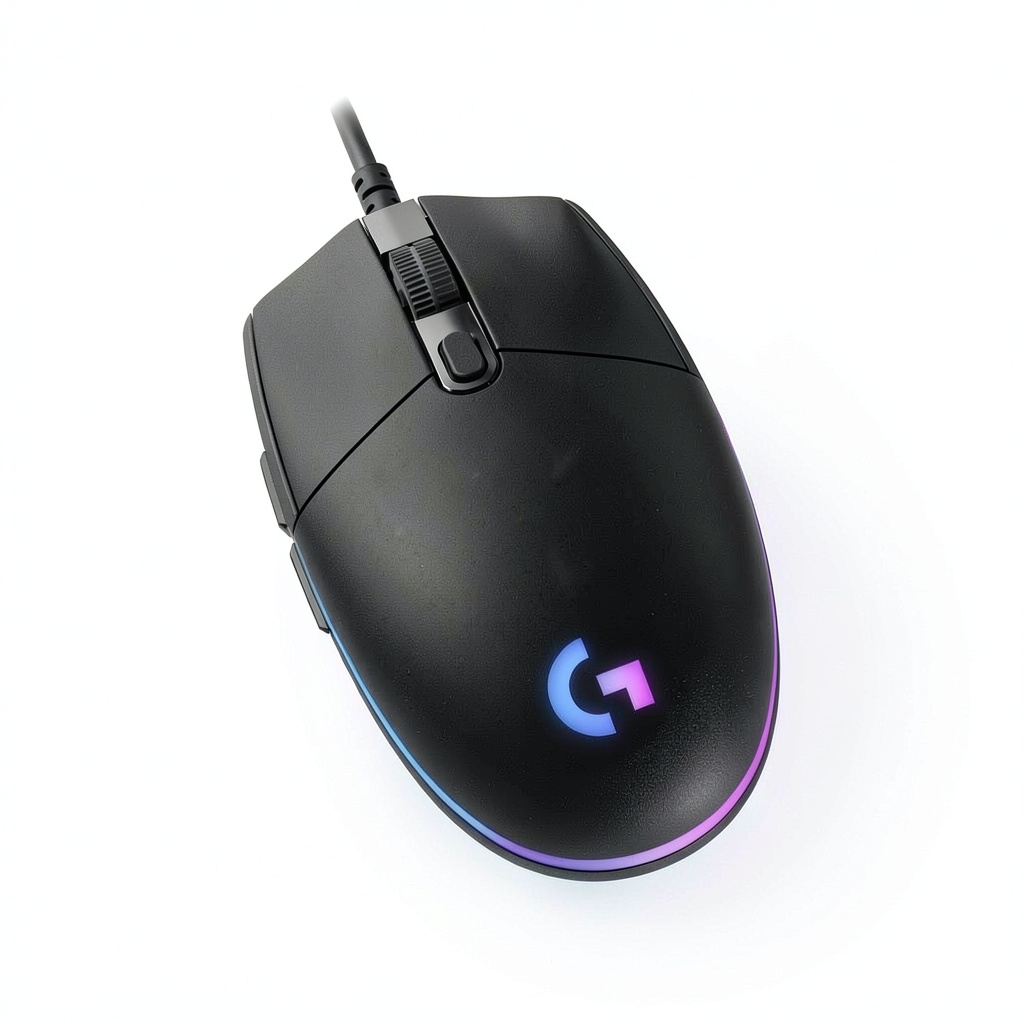
Unboxing the G203, the first thing you notice is the straightforward packaging – no fancy magnetic boxes here, but everything you need is included. The mouse itself has a clean, symmetrical design that works equally well for right and left-handed users, though lefties will need to adapt to the side button placement.
During my testing, the matte plastic finish held up surprisingly well against sweat and oils from extended gaming sessions. However, after about two months of heavy use, I noticed slight glossing on the main click areas where my fingers make constant contact. This is normal for mice in this price range, but worth noting if you’re expecting the same durability as $80+ options.
The scroll wheel deserves particular praise – it strikes an excellent balance between defined steps and smooth scrolling. For browsing documents or web pages, it’s comfortable and precise. In gaming scenarios, the middle click requires just the right amount of pressure – not so light that you accidentally trigger it during tense moments, but not so heavy that it strains your finger.
Performance in Real Use
Where the Logitech G203 LIGHTSYNC truly justifies its reputation is in sensor performance. I tested this mouse across multiple surfaces – from premium gaming pads to basic office desks and even uneven wooden surfaces. The sensor tracked consistently without noticeable acceleration or prediction issues that plague cheaper alternatives.
In competitive gaming scenarios like Valorant and Apex Legends, the sensor kept up with rapid flicks and precise micro-adjustments. I didn’t experience the spin-out issues that sometimes affect budget sensors during extreme movements. The 1,000Hz polling rate provides that immediate, connected feel that competitive gamers demand.
However, there’s a trade-off: while the sensor itself is excellent, the mouse feet are adequate but not exceptional. They glide smoothly enough for casual gaming, but serious competitive players might want to invest in aftermarket feet for that extra edge in glide consistency.
Ease of Use
Setting up the G203 is straightforward – plug it in, and it works immediately as a basic mouse. But the real value comes from installing Logitech’s G Hub software. The interface is intuitive compared to some competing software, allowing quick DPI adjustments, button remapping, and lighting customization.
I particularly appreciated the on-the-fly DPI switching, which I configured for different scenarios: low DPI for precise photo editing, medium for general computing, and higher settings for fast-paced gaming. The ability to save profiles directly to the mouse’s memory means you can take your settings to another computer without reinstalling software.
The RGB lighting through LIGHTSYNC technology is more than just cosmetic flair. During gaming sessions, I synced the lighting with in-game events in supported titles – health warnings, ability cooldowns, and other status indicators became immediately visible in my peripheral vision. For productivity, I set up color-coded profiles for different applications, making it easy to see which configuration was active at a glance.
Durability & Reliability
After three months of daily use, the G203 has shown no signs of failure. The mechanical buttons maintain their crisp click feel, and the scroll wheel remains precise. This reliability stems from Logitech’s experience in the peripheral market – they understand where to invest in components that matter.
The braided cable deserves special mention. It’s flexible enough not to drag on the mousepad but durable enough to resist kinking and damage from regular movement. I’ve had cheaper mice fail at the cable stress points within weeks, but the G203’s cable design shows thoughtful engineering.
That said, I have encountered the common issue with Logitech switches developing double-click problems over extended periods (typically 12+ months with heavy use). This isn’t unique to the G203 – it affects many Logitech mice due to their switch choice. For most users, this won’t be an issue within the typical upgrade cycle, but competitive gamers relying on absolute consistency might consider this a long-term concern.
Pros & Cons
Pros
- Exceptional value for money – performance that rivals mice costing twice as much
- Reliable sensor implementation with minimal smoothing or acceleration issues
- Comfortable symmetrical shape that works for most hand sizes and grip styles
- Robust software support through Logitech G Hub with extensive customization
- Durable construction that withstands regular travel and heavy use
Cons
- Basic mouse feet that could benefit from aftermarket upgrades for competitive play
- Shape may cause fatigue for users with very large hands during extended sessions
- Potential for switch issues developing after 12+ months of heavy use
- Limited programmable inputs compared to more expensive gaming mice
- Plastic construction lacks the premium feel of higher-end alternatives
Comparison & Alternatives
Cheaper Alternative: Redragon M711 Cobra
At around $15-20, the Redragon M711 represents the floor for functional gaming mice. While it offers similar DPI numbers and RGB lighting, the sensor implementation falls short of the G203’s precision. During testing, I noticed more smoothing and slight acceleration that would bother competitive gamers. The build quality also feels notably cheaper, with more plastic creak and less refined buttons.
Choose this if: Your budget is absolutely fixed under $20, and you’re willing to accept some performance trade-offs for basic gaming functionality.
Premium Alternative: Razer Viper Mini
Priced around $40-50, the Razer Viper Mini represents the next tier up from the G203. The key differences become apparent during extended use: lighter weight (61g vs 85g), superior feet for smoother gliding, and optical switches that eliminate double-click concerns. The shape is more specialized for fingertip and claw grips, which may or may not suit your preferences.
Choose this if: You’re serious about competitive gaming and value every gram of weight reduction, need absolute switch reliability, or prefer a more specialized shape for specific grip styles.
Buying Guide / Who Should Buy
Best for Beginners
If you’re new to PC gaming or upgrading from a basic office mouse, the Logitech G203 LIGHTSYNC represents the perfect starting point. The learning curve is gentle, the software introduces you to customization without overwhelming complexity, and the performance is sufficient to develop your skills without hardware limitations. At this price point, you can make mistakes in your peripheral journey without significant financial commitment.
Best for Professionals
For office workers, content creators, and anyone spending long hours at the computer, the G203 offers reliable performance and comfort that basic office mice can’t match. The precise tracking improves workflow in design applications, while the customizable buttons can be mapped to common shortcuts. The RGB lighting, while seemingly gaming-focused, can be set to subtle effects or color-coded by application for improved productivity.
Not Recommended For
Avoid the G203 if: You have very large hands (20cm+ from wrist to middle fingertip) and plan extended gaming sessions, as the compact shape may cause cramping. Competitive esports professionals should consider investing in lighter, more specialized options. Those who prefer heavy, substantial mice may find the 85g weight too lightweight for their preferences.
FAQ
Is the Logitech G203 good for FPS games?
Yes, with caveats. The sensor performance is excellent for the price and will serve most FPS players well. However, the weight (85g) and feet may hold back top-tier competitive players who need every possible advantage. For casual to semi-competitive play, it’s more than sufficient.
How does the G203 compare to more expensive Logitech mice?
The G203 shares DNA with pricier Logitech options but makes strategic compromises. You get the same quality sensor implementation as more expensive models, but with simpler switches, basic feet, and less premium materials. For most users, these trade-offs are worth the significant savings.
Does the RGB lighting affect performance?
No meaningful performance impact in real-world testing. The lighting draws minimal power via USB, and I measured no difference in sensor performance or polling consistency with lighting effects enabled versus disabled.
How long does the G203 typically last?
With normal use, most users report 2-3 years of reliable service. The most common failure point is the microswitches developing double-click issues after heavy use, which is repairable if you’re comfortable with basic soldering.
Is the software required for basic use?
No – the mouse works immediately as a standard mouse when plugged in. The software is only needed for DPI adjustment beyond the default steps, button remapping, and lighting customization. Once configured, settings can be saved to the mouse’s onboard memory.