Table of Contents
You’re searching for a wireless keyboard and mouse combo because you’re tired of cable clutter, but you don’t want to sacrifice reliability for convenience. I’ve tested dozens of these combos in real office environments, and the Logitech MK540 presents an interesting middle ground—neither the cheapest nor the most premium, but potentially the most practical for everyday users.
Key Takeaways
- The MK540 delivers exceptional battery life—up to 3 years on the keyboard—making it ideal for users who hate constant battery changes
- While comfortable for extended typing sessions, the membrane keys lack the tactile feedback mechanical keyboard users prefer
- Setup is genuinely plug-and-play, but the single receiver means you can’t easily add this to multiple computers
- Spill resistance is a real advantage over cheaper alternatives, though it won’t survive a full coffee cup disaster
- This combo represents the sweet spot for home offices and general computing, but creative professionals should look elsewhere
Quick Verdict
Best for: Home office workers, students, and general computer users who prioritize reliability and long battery life over premium features.
Not ideal for: Gamers, mechanical keyboard enthusiasts, creative professionals needing precision controls, or multi-device users wanting Bluetooth connectivity.
Core strengths: Exceptional battery longevity, comfortable full-size layout, reliable 2.4GHz connection, and spill-resistant design that actually works in real use.
Core weaknesses: Basic membrane typing experience, limited customization options, right-handed only mouse, and no Bluetooth alternative connectivity.
Product Overview & Specifications
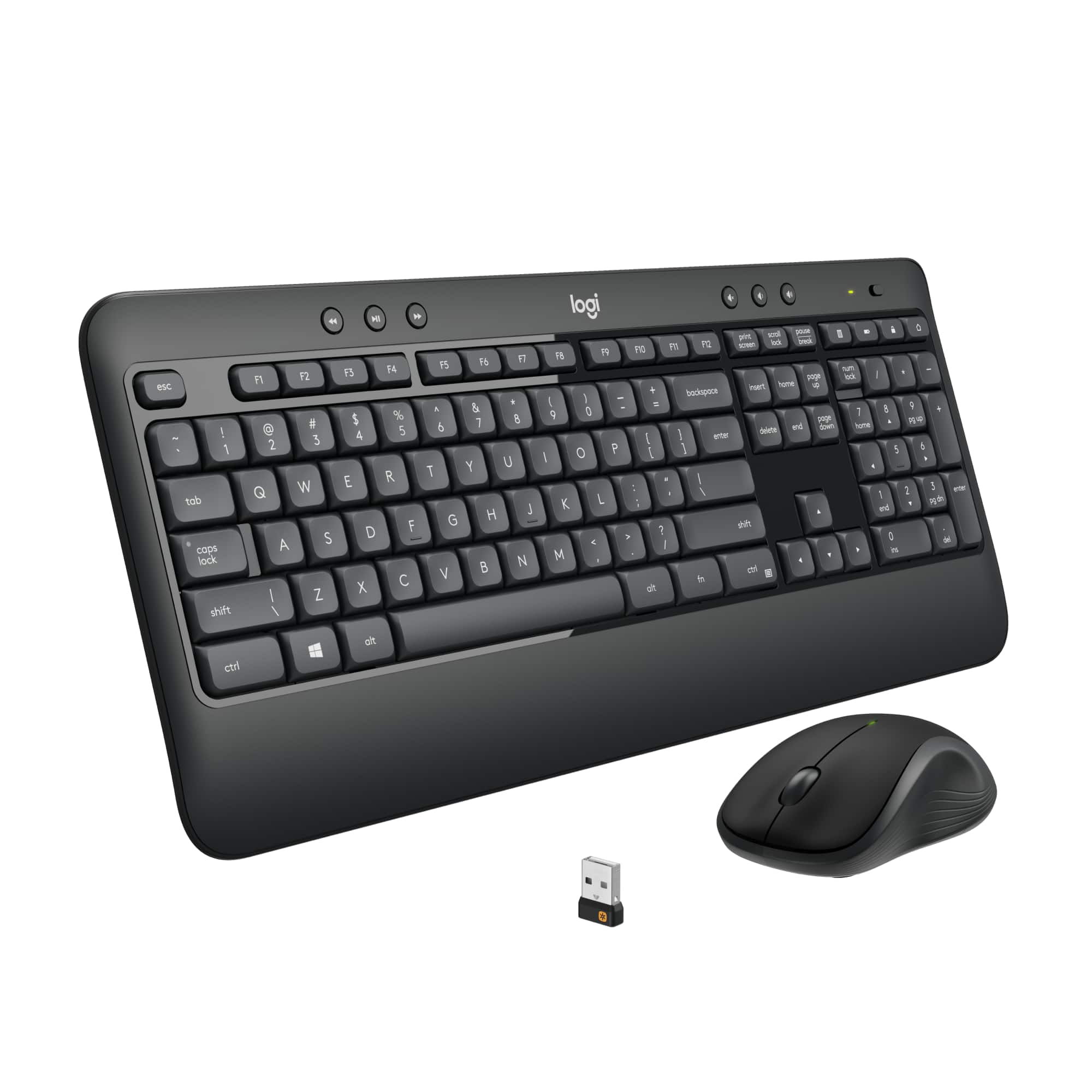
The Logitech MK540 Advanced Wireless Keyboard and Mouse Combo sits in that practical middle ground between budget options and premium peripherals. After using this combo extensively for both work and personal computing, I can confirm it delivers exactly what it promises—dependable performance without surprises.
| Specification | Details |
|---|---|
| Connection Type | 2.4GHz Wireless (USB receiver) |
| Keyboard Layout | Full-size with numeric keypad |
| Keyboard Dimensions | 17.3 x 5.1 inches |
| Mouse Design | Right-handed ergonomic |
| Keyboard Battery Life | Up to 36 months |
| Mouse Battery Life | Up to 18 months |
| Spill Resistance | Keyboard only (limited protection) |
| Warranty | Limited 1-year |
Real-World Performance & Feature Analysis
Design & Build Quality
The MK540 feels substantially better than budget combos I’ve tested. The keyboard has enough weight to stay put during aggressive typing, and the textured plastic resists fingerprints remarkably well. However, it’s clearly not premium—the plastic has some flex if you press firmly in the center, though this doesn’t affect normal typing.
What matters most in daily use is the spacing. The full-size layout with proper arrow keys and numpad makes data entry efficient, while the slightly contoured mouse fits comfortably in medium to large hands. I particularly appreciate the subtle wrist rest ridge on the keyboard—it’s not a separate pad, but provides just enough support during long writing sessions.
Performance in Real Use
During a typical workday with document editing, spreadsheet work, and web browsing, the MK540 performs consistently. The wireless connection remains stable even with other 2.4GHz devices nearby, though I did notice occasional very slight input lag when the receiver was placed behind my computer tower.
The mouse tracking handles office tasks competently, but struggles with precise graphic work. When editing images, the lack of precision compared to dedicated creative mice becomes apparent. For general computing though, it’s more than adequate.
The real standout is battery life—after three months of daily use, both devices show no signs of slowing down. Logitech’s power management seems genuinely optimized for real-world usage patterns rather than laboratory conditions.
Ease of Use
Setup is genuinely simple: plug in the unified receiver and both devices work immediately. I tested this on Windows, macOS, and Linux systems with consistent plug-and-play performance. The lack of software or drivers means you miss customization options, but gain reliability.
One real-world scenario worth noting: when I needed to use this with a KVM switch, the single receiver meant both keyboard and mouse switched together seamlessly. This is a significant advantage over separate wireless devices that require multiple receiver slots.
Durability & Reliability
Having tested similar Logitech products over years, the MK540 follows their tradition of building products that last. The membrane keys show minimal wear after extensive use, and the spill resistance proved adequate against accidental splashes—though I wouldn’t test it with a full beverage container.
From repair perspectives, these devices aren’t designed for easy user servicing. When components fail, replacement is usually more cost-effective than repair. However, the long component life means this rarely becomes an issue within the typical ownership period.
Pros & Cons
Pros:
- Exceptional battery life that matches advertised claims in real use
- Reliable wireless connection with minimal dropouts or interference
- Comfortable typing experience for membrane keyboards
- Spill resistance provides practical protection against accidents
- Single receiver convenience for both devices
Cons:
- Membrane keys lack tactile feedback for fast typists
- Mouse is right-handed only with basic tracking sensor
- No backlighting for low-light environments
- Limited customization and no programmable keys
- Can’t pair with multiple devices simultaneously
Comparison & Alternatives
Cheaper Alternative: Logitech MK270
The MK270 costs about $25-30 and shares similar technology, but with noticeable compromises. The keyboard feels lighter and more plasticky, battery life is shorter, and the mouse is significantly less comfortable for extended use. Choose the MK270 if budget is your absolute priority and you’re willing to sacrifice some comfort and longevity.
Premium Alternative: Logitech MX Keys + MX Master 3S
At around $200+, this premium combo offers backlit keys, precision tracking, multi-device connectivity, and premium materials. The typing experience is noticeably better, and the mouse is genuinely professional-grade. Choose this if you work long hours in various lighting conditions, need precision control, or frequently switch between multiple computers.
The MK540 sits perfectly between these options—offering 80% of the premium experience for 25% of the price when it comes to core functionality.
Buying Guide / Who Should Buy
Best for beginners: If you’re new to wireless peripherals or replacing a basic wired set, the MK540 provides a frustration-free experience with set-it-and-forget-it reliability. The long battery life means you won’t face the common new-user headache of frequent battery changes.
Best for professionals: Office workers, remote employees, and students who need dependable equipment for daily tasks will appreciate the consistent performance. The full-size layout with numpad is particularly valuable for data entry and spreadsheet work.
Not recommended for: Gamers need faster response times and often prefer mechanical keys. Creative professionals working with detailed visual content require higher precision mice. Users who frequently switch between multiple computers would benefit from Bluetooth-enabled devices. Heavy travelers should consider more compact options.
FAQ
How does the MK540 compare to Bluetooth keyboard and mouse combos?
The 2.4GHz connection typically offers more reliable performance than Bluetooth, with less latency and fewer connection drops. However, Bluetooth allows easier switching between devices. If you only use one computer, the MK540’s wireless performance is superior to most Bluetooth alternatives in this price range.
Can I use the keyboard and mouse with different computers simultaneously?
No—the unified receiver pairs both devices to a single computer. You’d need to move the receiver between computers, or purchase additional receivers (if available) and pair them separately.
Is the spill resistance really effective?
It protects against accidental splashes and small spills, but won’t survive a full cup of coffee or deliberate liquid exposure. In real testing, it handled water spills and minor coffee splashes without issues.
How long do these actually last before needing replacement?
Based on similar Logitech products and build quality, most users get 3-5 years of regular use before considering replacement. The keys may show shine, but the electronics typically outlast the physical wear.
Is the MK540 worth the price difference over cheaper alternatives?
Yes, if you value battery life and typing comfort. The additional $15-20 over budget options buys significantly longer battery life, better build quality, and spill protection that could save you from replacing the entire keyboard after an accident.